
Running Foldr on a custom HTTPS port
By default Foldr accepts client connections on the standard HTTPS port, TCP 443. You can change this from the appliance console with the set-https-port command. The most common reason to do so is port-forwarding behind a single public IP where TCP 443 is already taken by another service.
Reserved ports
The ports below are reserved by Foldr internally and cannot be used as the client-access HTTPS port:
| Port | Used by |
|---|---|
| 25 | SMTP (Inbox shares) |
| 80 | HTTP redirect / Let’s Encrypt validation |
| 2082 | SSH on Foldr v4 to v9 |
| 20820 | SSH on Foldr v10 and later |
| 3306 | MySQL between cluster nodes |
| 4444, 4567, 4568 | Cluster replication |
| 5481 | Update channel |
| 6379, 6380 | Redis and Redis queue |
| 8080 | Internal HTTP |
| 8983 | Search |
| 11211 | Memcached |
| 30537 | Foldr Settings (admin) on Foldr v9 and older |
Changing the port
Sign into the appliance console as fadmin, either via the hypervisor console or over SSH. The default SSH port is 2082 on v9 and earlier, 20820 on v10 and later.
set-https-port <port>For example, to use TCP 8443:
set-https-port 8443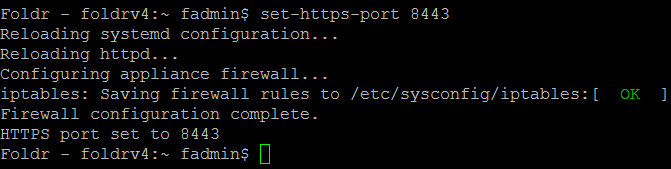
The web server restarts automatically. Once it’s back, the web app is reachable at https://your-foldr:8443/.

After the change
A few things to remember once Foldr is on a non-standard port:
- Bookmarks and the desktop apps need updating. Users with the old URL pinned will get connection refused on next launch.
- Public links automatically include the port in their generated URL.
- TLS certificates are unaffected. The certificate is bound to the hostname, not the port.
- Reverting is the same command with
443:set-https-port 443.
Related articles
- What network ports are used by Foldr?: the full list of ports the appliance opens.
- The appliance console: command list: every console command, not just network.