
Editing documents in Office On-line Server (on-premise Office Web Apps)
Office Online Server is in maintenance mode. Microsoft has stopped active feature development on Office Online Server. The product is still supported and receives security updates, but new functionality is going to the cloud-hosted Microsoft 365 / Office for the web service. If you’re starting from scratch, prefer the Microsoft 365 Office Online integration over deploying a new Office Online Server.
Foldr supports editing Office documents in Microsoft Office Online Server (on-premise / self hosted Office web apps server) directly in a web browser. This provides users with the convenience of editing documents without the need for locally installed Office applications and also without having to depend on third-party solutions that are hosted in the public cloud.
When the Office Online Server service has been enabled users in the web app will be offered an Edit in Office Online Server button for files in Word, Excel, PowerPoint and Open Office document formats.
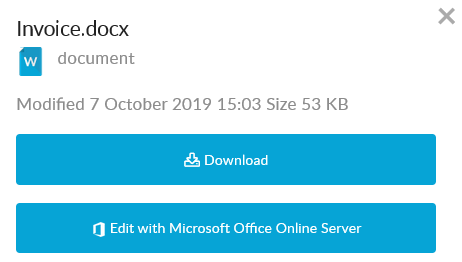
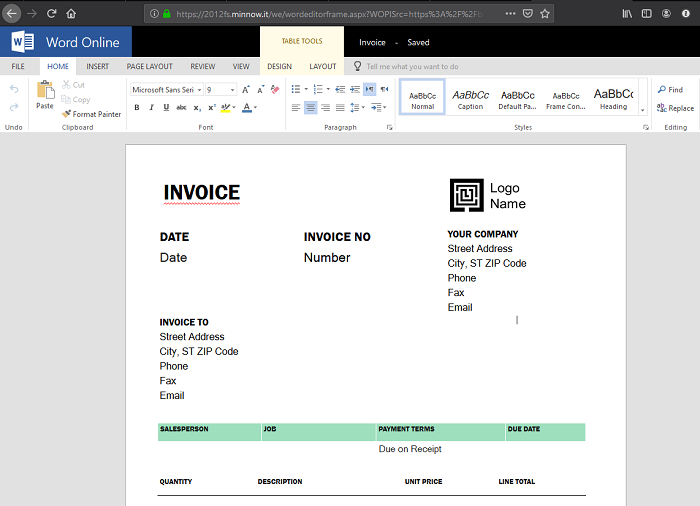
Clicking the Edit button will present the document in the Office web app interface ready to edit. All document changes are saved automatically and when the editing tab is closed, the file is written back to the original location in Foldr.
Prerequisites
1. Office web app server should be updated to the latest available release, or alternatively TLS 1.2 support manually enabled as per the following update:
2. Suitable SSL certificate installed on both Foldr and Office web app servers
Enabling the Office Online Server integration:
1. Within Foldr Settings >> Integrations >> Office Online Server enable the switch labelled ‘Allow users to edit documents with ‘Microsoft Office Online Server‘
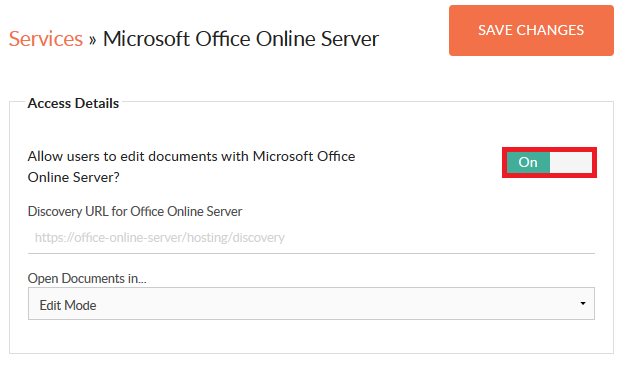
2. Populate the ‘Discovery URL for Office Online Server’ with the FQDN of the Office Online Server address, appending /hosting/discovery
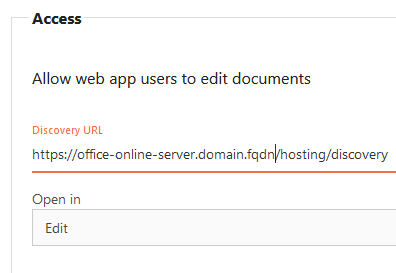
3. Optionally set the default mode that documents will open in, either Edit mode or View. If View is selected the user must click an ‘Edit in Browser’ button before it is possible to edit the document.
4. Click SAVE CHANGES
The integration is now complete and user signing into the Foldr web app should be able to edit/view Office documents in on-premise Office web apps.